
What's new in Herb v0.9
March 13, 2026 • Marco Roth

Today, we are excited to announce Herb v0.9!
If you're not familiar with Herb yet: Herb is the modern HTML+ERB toolchain. It's an ecosystem of powerful and seamless developer tools for HTML+ERB (.html.erb) templates. At its core is the Herb Parser, a fast, portable, and HTML-aware ERB parser written in C.
The toolchain includes a linter, formatter, language server, and rendering engine, with language bindings for Ruby, Node.js, Java, Rust, and the browser via WebAssembly. If you haven't used Herb before, we suggest reading the Overview page first.
The vision is to treat HTML+ERB as a first-class language with the same level of tooling support you'd expect from any modern programming language: parsing, linting, formatting, code intelligence, and error reporting, while also improving HTML rendering from Ruby and driving innovation in the Ruby and Rails view layers.
Quick links:
We would like to thank all contributors and everyone who reported issues to get this release out of the door. This release includes contributions from 13 different contributors across 198 commits, a new record for community involvement. We encourage you to get involved and help us improve Herb for the entire community. Feel free to check out the open issues or get in touch.
For the latest news about Herb, follow @marcoroth on any of the socials.
What's New in Herb v0.9
While v0.8 expanded the ecosystem with new language bindings and configuration, v0.9 focuses on stability, depth, and practical features. The goal is to make the foundation as solid as possible so we can start building more ambitious things on top of it, including reactivity in the rendering engine.
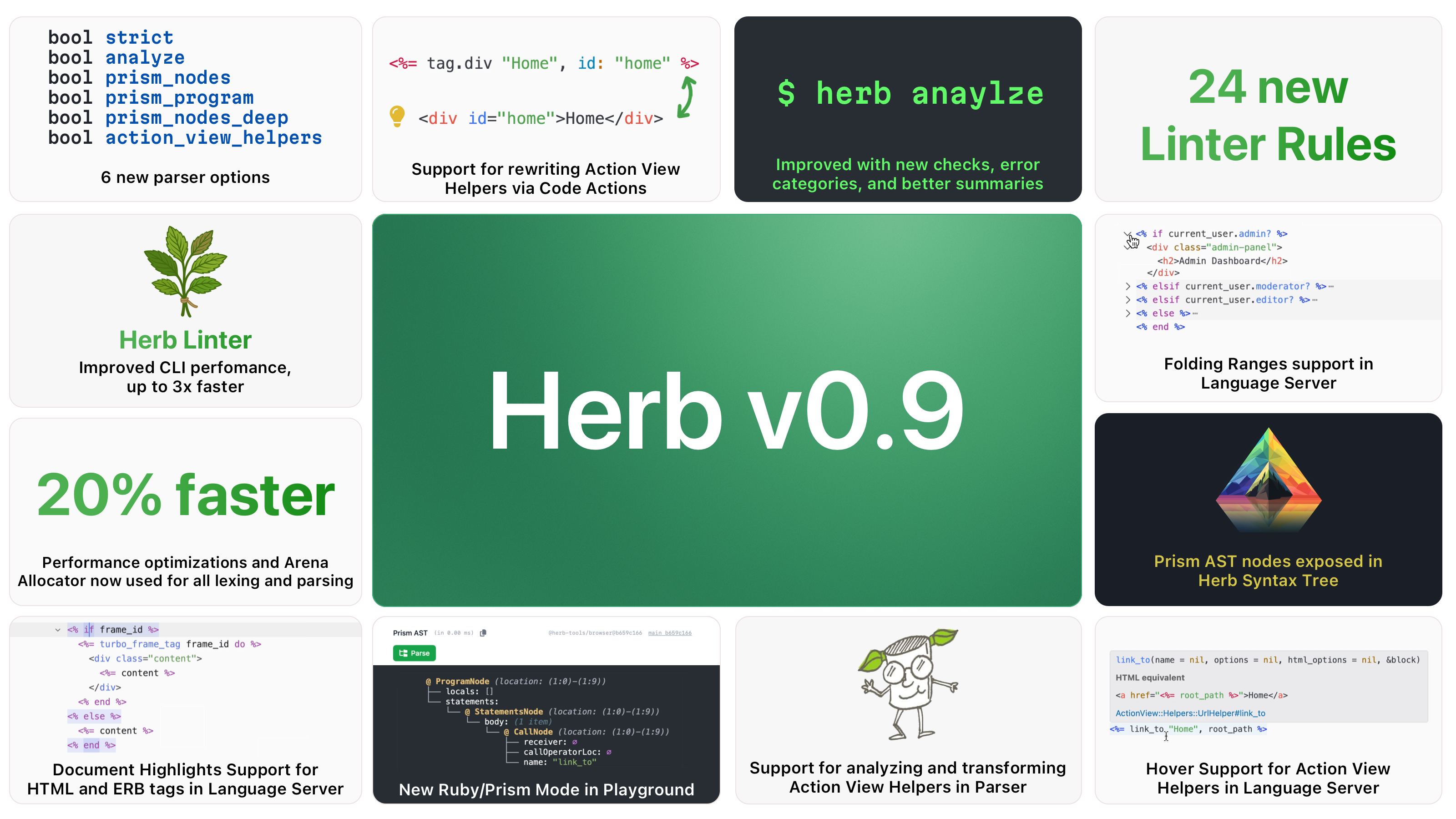
A lot of bugs have been resolved across the parser, engine, and formatter. The parser now understands Action View tag helpers, conditional HTML wrapping patterns, and omitted closing tags, deepening Herb's understanding of HTML+ERB templates.
The arena allocator is now fully integrated for all lexing and parsing.
Action View Tag Helper Support
This is the headline feature of Herb v0.9. The parser can now analyze and transform Action View tag helpers like tag.*, content_tag, and link_to into their equivalent HTML element representations in the syntax tree.
This means Herb's linter, formatter, and language server can now understand and reason about Ruby helper calls the same way they reason about raw HTML tags.
How It Works
A new action_view_helpers parser option enables this analysis. When enabled, the parser detects supported helper calls and transforms them into synthetic HTMLElementNode AST representations. HTML attributes are extracted from Ruby keyword arguments, including data/aria nested hashes, attribute splats, interpolated strings, and method/remote to data-* conversions.
For example, the following template:
<%= tag.div class: "wrapper", data: { controller: "hello" } do %>
  Hello
<% end %>
Gets parsed and transformed into an HTMLElementNode with tag name div, a class="wrapper" attribute, and a data-controller="hello" attribute, all extracted from the Ruby keyword arguments:
@ DocumentNode (location: (1:0)-(3:9))
└── children: (1 item)
    └── @ HTMLElementNode (location: (1:0)-(3:9))
        ├── open_tag:
        │   └── @ ERBOpenTagNode (location: (1:0)-(1:65))
        │       ├── tag_opening: "<%=" (location: (1:0)-(1:3))
        │       ├── content: " tag.div class: \"wrapper\", ... do " (location: (1:3)-(1:63))
        │       ├── tag_closing: "%>" (location: (1:63)-(1:65))
        │       ├── tag_name: "div" (location: (1:8)-(1:11))
        │       └── children: (2 items)
        │           ├── @ HTMLAttributeNode
        │           │   ├── name: "class"
        │           │   └── value: "wrapper"
        │           │
        │           └── @ HTMLAttributeNode
        │               ├── name: "data-controller"
        │               └── value: "hello"
        │
        ├── tag_name: "div" (location: (1:8)-(1:11))
        ├── body: (1 item)
        │   └── @ HTMLTextNode (location: (1:65)-(3:0))
        │       └── content: "\n  Hello\n"
        │
        ├── close_tag:
        │   └── @ ERBEndNode (location: (3:0)-(3:9))
        │       ├── tag_opening: "<%" (location: (3:0)-(3:2))
        │       ├── content: " end " (location: (3:2)-(3:7))
        │       └── tag_closing: "%>" (location: (3:7)-(3:9))
        │
        ├── is_void: false
        └── element_source: "ActionView::Helpers::TagHelper#tag"
The open tag is represented as a new ERBOpenTagNode, while the closing <% end %> becomes the close tag of the HTML element. The element_source field identifies which helper produced the node. This enables all existing HTML-focused tooling to work seamlessly with Action View helpers.
Rewriting Between HTML and Helpers
Building on the parser's new capabilities, Herb v0.9 ships two new built-in rewriters: action-view-tag-helper-to-html and html-to-action-view-tag-helper.
This allows you to rewrite an Action View Tag Helper like:
<%= tag.div class: classes, data: { controller: "hello" } do %>
  Content
<% end %>
to plain HTML:
<div class="<%= classes %>" data-controller="hello">
  Content
</div>
And back! This opens the door for code actions, refactoring tools, and migration scripts that can convert between the two styles.
Language Server Integration
The language server takes full advantage of these new capabilities:
Hover Provider: Hover over an Action View helper to see its documentation and the equivalent HTML representation.
Code Actions: Quickly convert between Action View helpers and plain HTML using code actions.
Linter Awareness: Existing linter rules now understand Action View helpers and can lint them accordingly. For example, the
html-anchor-require-hrefrule can now also flag helper-based markup, not just plain<a>tags:erb<a href="#">Home</a><%= link_to "Home", "#" %>This means that as more helpers are supported, existing rules automatically gain coverage over helper-based markup too.
Prism AST Nodes in the Syntax Tree
Herb v0.9 can now expose Prism AST nodes directly in the Herb Syntax Tree. Three new parser options control this behavior:
prism_nodes: exposes the Prism node for each individual ERB nodeprism_nodes_deep: includes all child nodes within block-level ERB expressionsprism_program: extracts the full Ruby program from the template and exposes the complete Prism program on theDocumentNode
For example, given the template <h1><%= @post.title %></h1>, the parser can now expose the Prism nodes in two different ways:
@ DocumentNode (location: (1:0)-(1:27))
└── children: (1 item)
    └── @ HTMLElementNode (location: (1:0)-(1:27))
        ├── open_tag:
        │   └── @ HTMLOpenTagNode (location: (1:0)-(1:4))
        │       ├── tag_opening: "<" (location: (1:0)-(1:1))
        │       ├── tag_name: "h1" (location: (1:1)-(1:3))
        │       ├── tag_closing: ">" (location: (1:3)-(1:4))
        │       ├── children: []
        │       └── is_void: false
        │
        ├── tag_name: "h1" (location: (1:1)-(1:3))
        ├── body: (1 item)
        │   └── @ ERBContentNode (location: (1:4)-(1:22))
        │       ├── tag_opening: "<%=" (location: (1:4)-(1:7))
        │       ├── content: " @post.title " (location: (1:7)-(1:20))
        │       ├── tag_closing: "%>" (location: (1:20)-(1:22))
        │       ├── parsed: true
        │       ├── valid: true
        │       └── prism_node:
        │           └── @ CallNode (location: (1:8)-(1:19))
        │               ├── receiver:
        │               │   └── @ InstanceVariableReadNode (location: (1:8)-(1:13))
        │               │       └── name: "@post"
        │               ├── callOperatorLoc: (location: (1:13)-(1:14))
        │               ├── name: "title"
        │               ├── messageLoc: (location: (1:14)-(1:19))
        │               ├── openingLoc: ∅
        │               ├── arguments_: ∅
        │               ├── closingLoc: ∅
        │               ├── equalLoc: ∅
        │               └── block: ∅
        │
        ├── close_tag:
        │   └── @ HTMLCloseTagNode (location: (1:22)-(1:27))
        │       ├── tag_opening: "</" (location: (1:22)-(1:24))
        │       ├── tag_name: "h1" (location: (1:24)-(1:26))
        │       ├── children: []
        │       └── tag_closing: ">" (location: (1:26)-(1:27))
        │
        ├── is_void: false
└── element_source: "HTML"@ DocumentNode (location: (1:0)-(1:27))
├── children: (1 item)
│ └── @ HTMLElementNode (location: (1:0)-(1:27))
│ ├── open_tag:
│ │ └── @ HTMLOpenTagNode (location: (1:0)-(1:4))
│ │ ├── tag_opening: "<" (location: (1:0)-(1:1))
│ │ ├── tag_name: "h1" (location: (1:1)-(1:3))
│ │ ├── tag_closing: ">" (location: (1:3)-(1:4))
│ │ ├── children: []
│ │ └── is_void: false
│ │
│ ├── tag_name: "h1" (location: (1:1)-(1:3))
│ ├── body: (1 item)
│ │ └── @ ERBContentNode (location: (1:4)-(1:22))
│ │ ├── tag_opening: "<%=" (location: (1:4)-(1:7))
│ │ ├── content: " @post.title " (location: (1:7)-(1:20))
│ │ ├── tag_closing: "%>" (location: (1:20)-(1:22))
│ │ ├── parsed: true
│ │ └── valid: true
│ │
│ ├── close_tag:
│ │ └── @ HTMLCloseTagNode (location: (1:22)-(1:27))
│ │ ├── tag_opening: "</" (location: (1:22)-(1:24))
│ │ ├── tag_name: "h1" (location: (1:24)-(1:26))
│ │ ├── children: []
│ │ └── tag_closing: ">" (location: (1:26)-(1:27))
│ │
│ ├── is_void: false
│ └── element_source: "HTML"
│
└── prism_node:
└── @ ProgramNode (location: (1:8)-(1:19))
├── locals: []
└── statements:
└── @ StatementsNode (location: (1:8)-(1:19))
└── body: (1 item)
└── @ CallNode (location: (1:8)-(1:19))
├── receiver:
│ └── @ InstanceVariableReadNode (location: (1:8)-(1:13))
│ └── name: "@post"
├── callOperatorLoc: (location: (1:13)-(1:14))
├── name: "title"
├── messageLoc: (location: (1:14)-(1:19))
├── openingLoc: ∅
├── arguments_: ∅
├── closingLoc: ∅
├── equalLoc: ∅
└── block: ∅ With prism_nodes, the Prism CallNode lives directly on the ERBContentNode, making it easy to access the Ruby AST for each individual ERB expression as you traverse the tree. With prism_program, the full Prism ProgramNode for all Ruby code in the template is attached to the root DocumentNode instead.
This integration is the foundation for more sophisticated Ruby-aware linter rules, refactoring tools, and code intelligence features. It also lays the groundwork for the reactivity work in Herb::Engine and ReActionView, where understanding both the HTML structure and the Ruby expressions within a template is essential for selective re-rendering.
Herb.parse_ruby and the Prism Playground
Building on the Prism integration, Herb v0.9 exposes a new Herb.parse_ruby API across all language bindings. This lets you parse Ruby code with Prism from anywhere Herb is available, without any HTML or ERB involvement:
irb(main):001> Herb.parse_ruby("Greeter.salute('Herb')")
=>
#<Prism::ParseResult:0x000000011ced9118
 @value=
  @ ProgramNode (location: (1,0)-(1,22))
  ├── locals: []
  └── statements:
      @ StatementsNode (location: (1,0)-(1,22))
      └── body: (length: 1)
          └── @ CallNode (location: (1,0)-(1,22))
              ├── receiver:
              │   @ ConstantReadNode (location: (1,0)-(1,7))
              │   └── name: :Greeter
              ├── name: :salute
              ├── arguments:
              │   @ ArgumentsNode (location: (1,15)-(1,21))
              │   └── arguments: (length: 1)
              │       └── @ StringNode (location: (1,15)-(1,21))
              │           └── unescaped: "Herb"
              └── block: ∅>
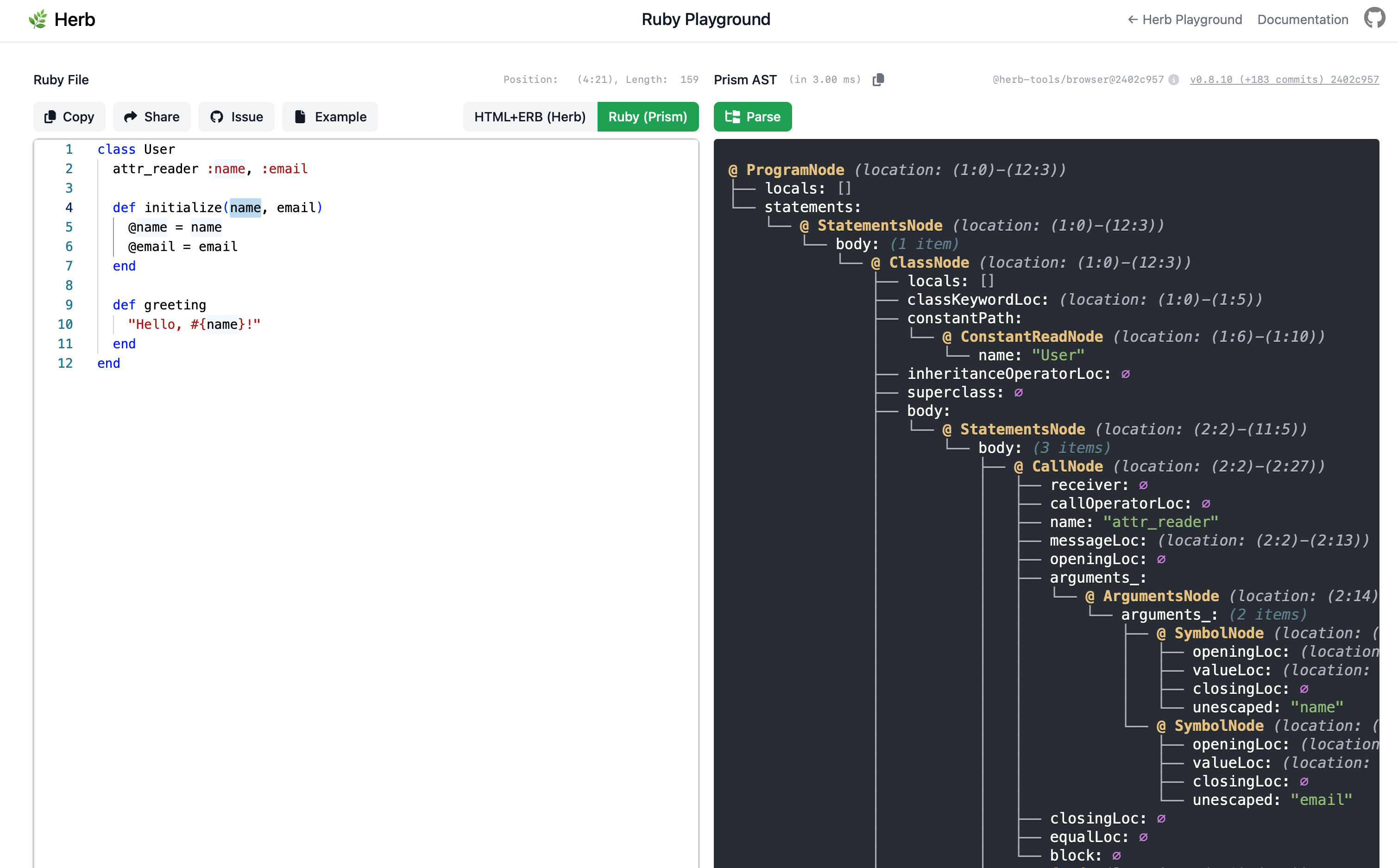
We also added a new Ruby Prism playground to the Herb website. It uses the same playground architecture as the existing HTML+ERB playground, but lets you inspect the Prism AST for any Ruby code directly in the browser:
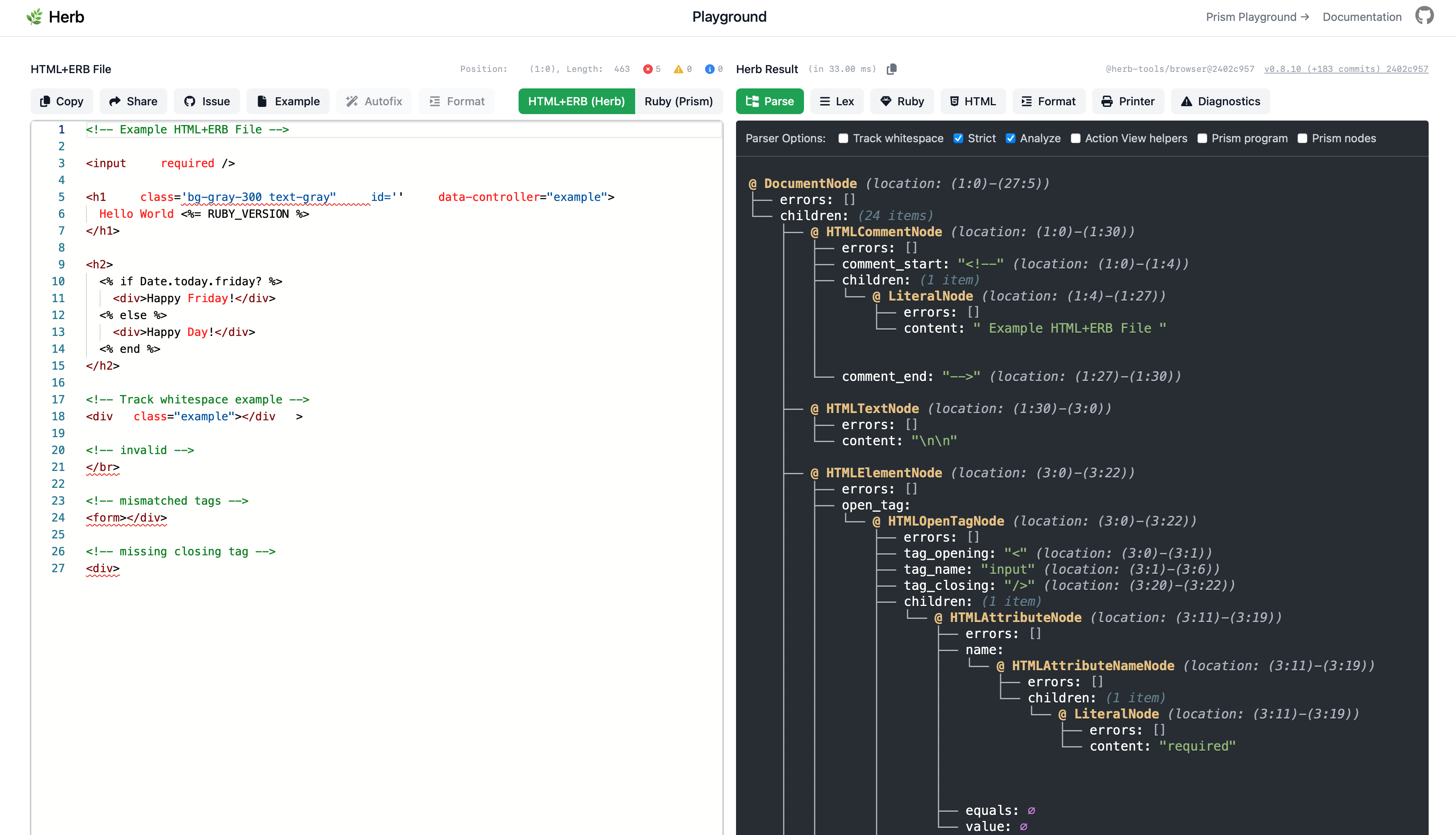
The existing HTML+ERB playground has also been updated to show the Prism nodes when using the prism_nodes or prism_program parser options:
Strict Parsing Mode
Herb v0.9 introduces a new strict parser option, which is now enabled by default in the engine.
In strict mode, the parser:
- Detects and reports HTML elements with omitted closing tags (like
<li>,<p>,<td>, etc.) using a newHTMLOmittedCloseTagNodeandOmittedClosingTagError
While these HTML patterns are technically valid per the spec, explicit closing tags improve template clarity and make tooling more reliable. The strict mode errors are emitted as warnings, and you can always opt out with strict: false.
<ul>
<li>Item 1 <li>Item 2</ul>In strict mode, the parser will warn that <li> elements have their closing tags omitted and suggest adding explicit </li> tags for clarity, while still producing a valid AST.
Friendly Error Messages
The parser now uses human-readable token names in error messages instead of internal identifiers. This makes parser errors much easier to understand, especially for users who aren't familiar with Herb's internals.
Before:
Unexpected Token. Expected: `TOKEN_IDENTIFIER, TOKEN_AT, TOKEN_ERB_START,
TOKEN_WHITESPACE, or TOKEN_NEWLINE`, found: `TOKEN_COLON`.
After:
Unexpected Token. Expected: an identifier, `@`, `<%`, whitespace,
or a newline, found: `:`.
Literal tokens like punctuation and delimiters are shown backtick-quoted (`<`, `<%`, `:`), while abstract tokens use natural English with articles (an identifier, a quote, whitespace, end of file).
The parser also introduces new error types to give more specific and actionable diagnostics:
StrayERBClosingTagError: Detects stray ERB closing tags that don't have a matching opening tag.erb<div>some content %></div>UnclosedCloseTagError: Reports HTML closing tags that are missing their closing>.erb<div>some content</divMissingAttributeValueError: Catches attributes with a trailing=but no value.erb<div class= ></div>
Conditional HTML Element Detection
One of the most requested parser improvements: Herb now understands conditional HTML wrapping patterns.
Previously, templates like this would produce orphaned open/close tags with confusing errors:
<% if @with_icon %> <div class="icon">
<% end %>
<span>Content</span>
<% if @with_icon %>
</div>
<% end %>Now, the parser detects matched pairs of conditional open and close tags and groups them into a single HTMLConditionalElementNode. This preserves the original ERB nodes while providing proper hierarchical structure for tooling.
A corresponding HTMLConditionalOpenTagNode is also introduced for cases where only the open tag is conditional.
New Linter Rules
Herb v0.9 adds 24 new linter rules spanning safety, accessibility, best practices, and Rails-specific patterns.
This release also introduces two new rule categories: erb-safety-* rules extracted from the Herb::Engine security validators and covering all checks from better-html and erb_lint, bringing Herb's linter to full parity with existing ERB safety tooling. And the first actionview-* rule category, dedicated to linting Action View-specific patterns.
ERB Safety Rules
erb-no-statement-in-script
Avoid<% %>tags inside<script>. Use<%= %>to interpolate values.erb-no-javascript-tag-helper
Avoidjavascript_tag. Use inline<script>tags instead.erb-no-unsafe-script-interpolation
ERB output in<script>tags must use.to_jsonto safely serialize values.erb-no-raw-output-in-attribute-value
Avoid<%==in attribute values. Use<%= %>instead.erb-no-unsafe-raw
Avoidraw()and.html_safein ERB output.erb-no-unsafe-js-attribute
ERB output inon*attributes must use.to_json,j(), orescape_javascript().erb-no-output-in-attribute-position
Avoid<%= %>in attribute position. Use<% if %>with static attributes instead.erb-no-output-in-attribute-name
Avoid ERB output in attribute names. Use static names with dynamic values.
ERB Rules
erb-no-conditional-html-element
Detect conditional HTML wrapping patternserb-no-conditional-open-tag
Detect conditional open tags without matching closeerb-no-duplicate-branch-elements
Detect elements duplicated acrossif/elsebrancheserb-no-inline-case-conditions
Avoid inlinecaseconditions in ERBerb-no-instance-variables-in-partials
Avoid instance variables in partials; use locals insteaderb-no-interpolated-class-names
Avoid string interpolation in HTML class attributeserb-no-then-in-control-flow
Avoidthenkeyword in ERB control flowerb-no-trailing-whitespace
Disallow trailing whitespace in ERB tags
Action View Rules
actionview-no-silent-helper
Avoid<% %>for helpers that produce output (use<%= %>)
HTML Rules
html-allowed-script-type
Restrict allowedtypeattributes on<script>tagshtml-details-has-summary
Require<summary>inside<details>elementshtml-no-abstract-roles
Disallow abstract ARIA roleshtml-no-aria-hidden-on-body
Disallowaria-hiddenon<body>html-require-closing-tags
Require explicit closing tags
Turbo Rules
turbo-permanent-require-id
Requireidon elements withdata-turbo-permanent
Spotlight: erb-no-duplicate-branch-elements
One rule worth highlighting is erb-no-duplicate-branch-elements. It detects when all branches of a conditional (if/elsif/else, case/when/else) wrap their content in the same HTML element, and suggests hoisting that element outside the conditional. It even comes with an autofix:
This level of understanding, awareness, and integration across ERB control flow and HTML structure is what makes Herb's linter unique.
Parallelized Linter CLI
The linter CLI now uses a worker-based architecture to parallelize file processing. On initial benchmarks, this shows significant speedups:
- 421 files: 2,958ms → 1,264ms (~2.3x faster)
- Large codebases: even more pronounced improvements
The parallelization level defaults to auto (based on available CPU cores) and can be customized via the CLI.
Linter CLI Improvements
The linter CLI received several quality-of-life improvements:
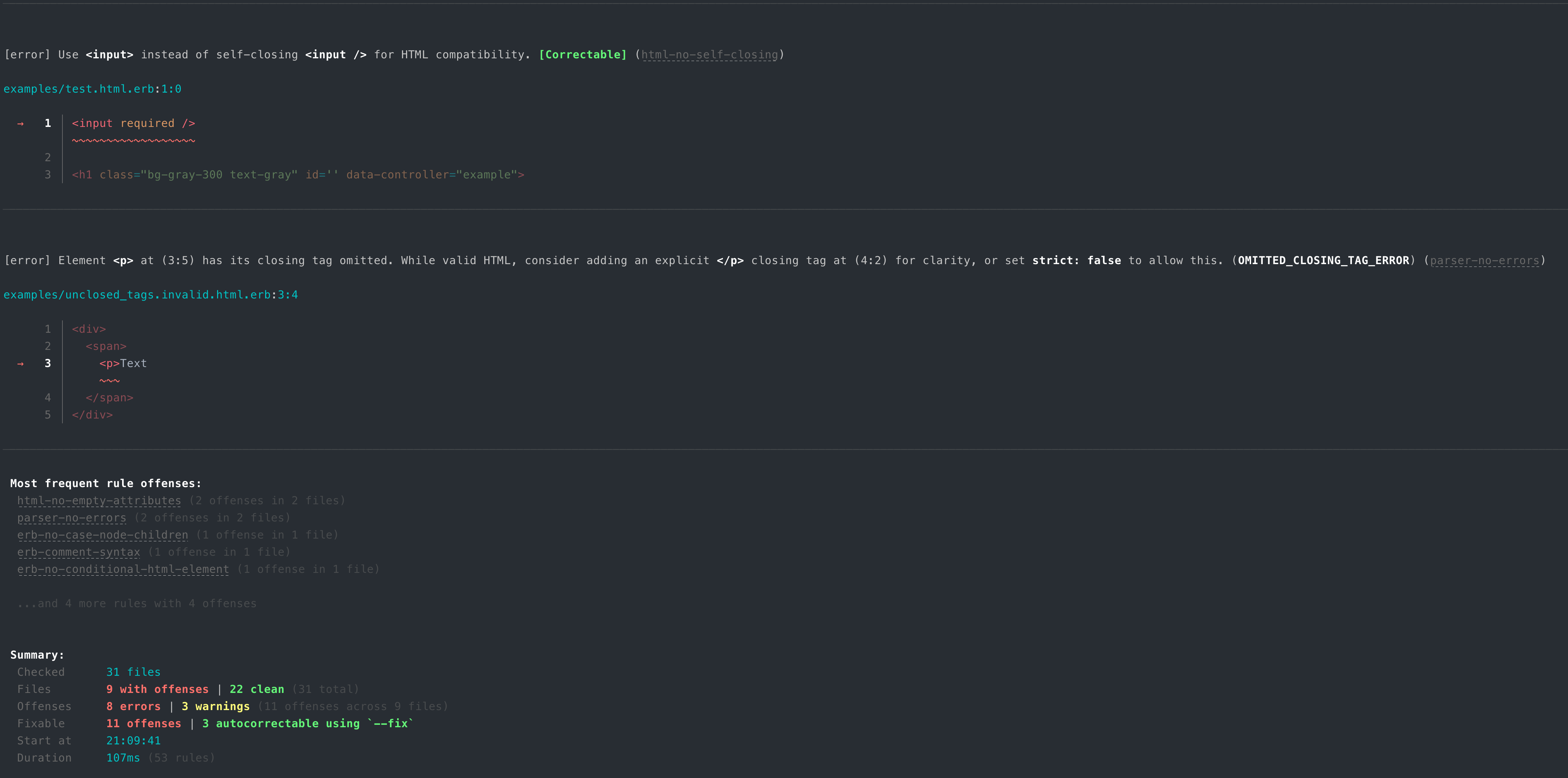
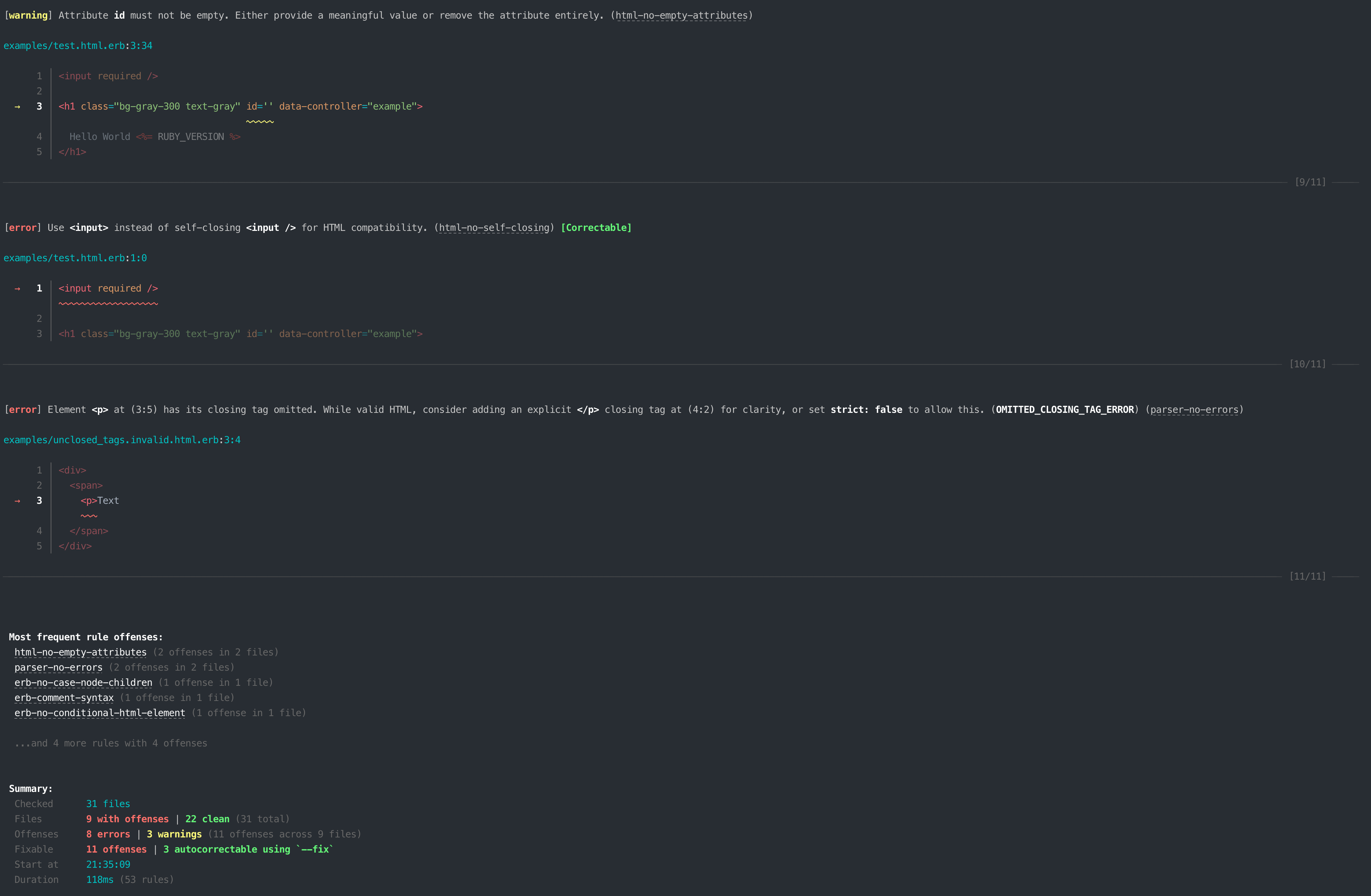
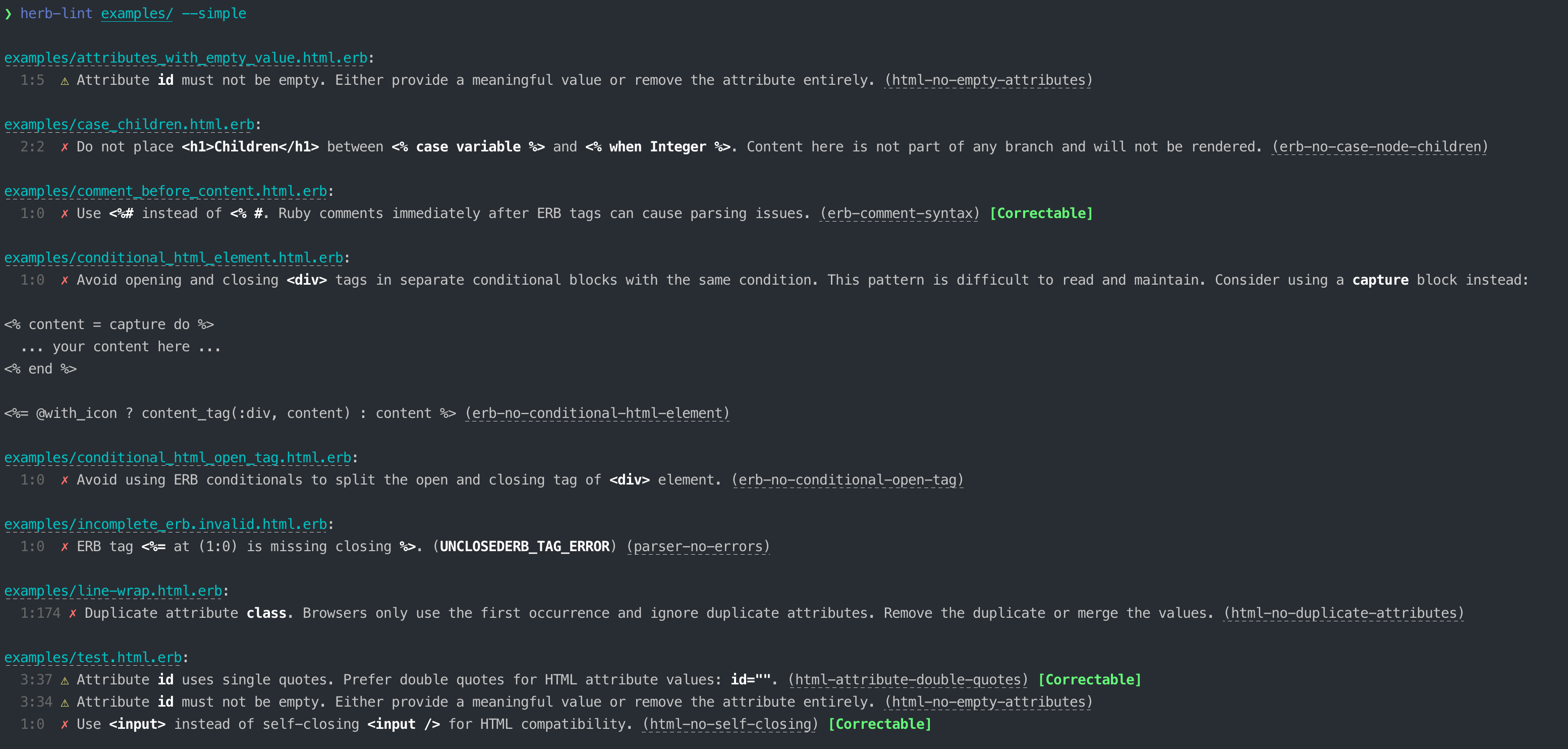
- Linked rule IDs: Rule identifiers in CLI output now link directly to their documentation page
- Linked file paths: File paths in output are now clickable terminal links
- Improved colors: Better color coding for different severity levels
- Accessibility rules as warnings: Accessibility-focused rules now default to
warningseverity instead oferror, making them less disruptive while still visible
Language Server Improvements
Folding Ranges
The language server now supports code folding, making it easier to navigate large templates by collapsing sections of HTML elements, ERB blocks, and control flow structures in your editor.
Document Highlights
Selecting an HTML tag, ERB block, or other identifiers now highlights all related occurrences in the document, such as matching open/close tags, variable references, and more.
Toggle Comments
The language server now properly handles the Toggle Comment command (Cmd+/ / Ctrl+/), inserting the correct ERB comment syntax (<%# ... %>) instead of HTML comments.
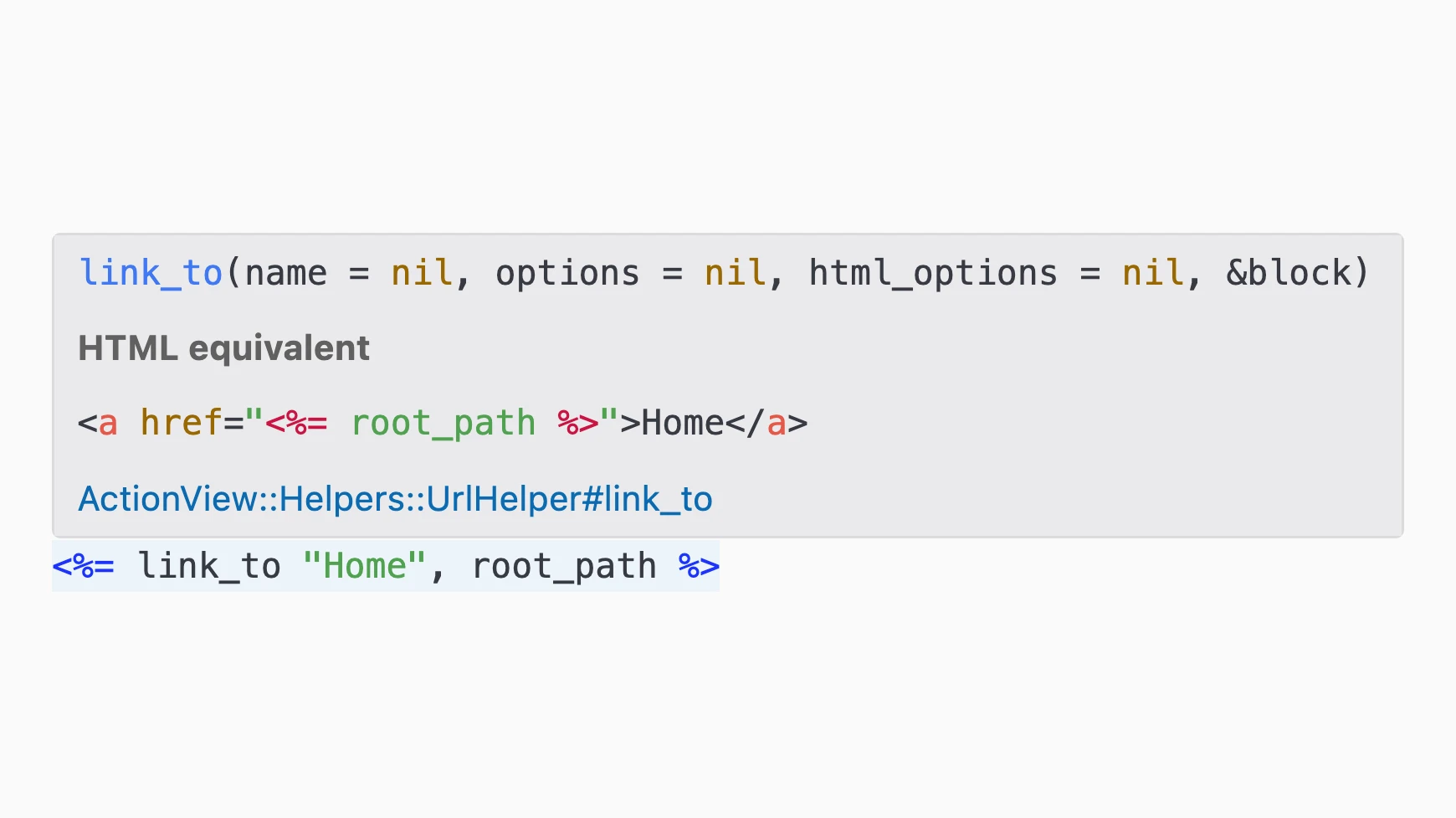
Hover Provider for Action View Helpers
Hovering over Action View tag helpers now shows the helper's signature, a link to the Rails documentation, and the equivalent HTML representation.
Code Actions for Action View Helpers
New code actions let you quickly convert between Action View helpers and plain HTML directly from your editor.
Engine Improvements
A key design goal of Herb::Engine is to maintain backwards compatibility with Erubi::Engine. As long as a template produces valid HTML, switching from Erubi to Herb should already be a drop-in replacement. If you want to use Herb::Engine in Rails, check out and install ReActionView. This release brings the engine closer to that goal with significant stability and robustness improvements.
Strict Mode by Default
Herb::Engine now operates in strict mode by default, producing more informative warnings about HTML patterns that could lead to ambiguity or tooling issues.
Engine Validators Configuration
The engine now supports a granular engine.validators configuration in .herb.yml, letting you control which validators run during template compilation. This replaces the earlier engine.security approach with a cleaner separation of concerns: validation_mode controls how errors are presented, while validators controls which validators run.
engine:
  validators:
    security: true
    nesting: true
accessibility: trueHerb::Engine.new(source, validators: { security: false })Disable Debug Spans via Comments
When using ReActionView's debug mode, the engine wraps ERB expressions with debug spans. However, when rendering content inside content_for blocks, the output may end up in a context (like <title>) where debug spans would produce invalid HTML.
You can now opt out of debug spans at the block level by adding a # herb:debug disable Ruby comment to the block opening:
<%= content_for :head do # herb:debug disable %>
  <%= tag.title @page_title %>
<% end %>
All ERB expressions within that block will skip the debug span wrapping.
Bug Fixes
Several bugs have been fixed that caused the engine to produce invalid Ruby in edge cases, improving reliability for real-world templates:
- Fixed ERB expression compilation when code contains heredocs
- Fixed newline handling after heredoc terminators
- Fixed inline comments on
<% end %>producing invalid Ruby in output blocks - Fixed
<%= -%>not trimming trailing newlines
Formatter Improvements
The formatter received a large number of bug fixes and improvements in this release, bringing it significantly closer to leaving its experimental status. Many of the fixes address real-world formatting issues reported by users who have been testing the formatter on their projects.
- User newline preservation: The formatter now respects intentional newlines in block elements, inline elements, and mixed content. This addresses one of the most common formatter complaints.
white-spacepreservation: Elements withwhite-space: preor similar CSS properties now have their content preserved during formatting.- Text flow engine: A new internal Text Flow Engine improves how mixed HTML text and ERB expressions are formatted together, fixing issues with punctuation separation and adjacent inline element spacing.
If you have been waiting to try the formatter, now is a great time to give it another shot. Please report any issues you encounter using the formatting issue template so we can continue to improve it.
Arena Allocator Integration
The arena allocator, introduced in Herb v0.8, is now fully integrated into all lexing and parsing operations. All allocated AST nodes, tokens, and internal strings are placed into a single arena that is freed in one shot after the parse tree has been converted to the binding's native objects.
This replaces hundreds of individual malloc/free calls with bulk allocation. Objects are allocated sequentially in large pages, which means better cache locality and fewer system calls. When the parse tree has been fully converted, the entire arena is freed in one shot instead of walking every node individually.
The arena is accessed through hb_allocator_T, a vtable-based allocator abstraction. All core data structures (hb_array, hb_buffer, hb_narray) have been migrated to use this infrastructure.
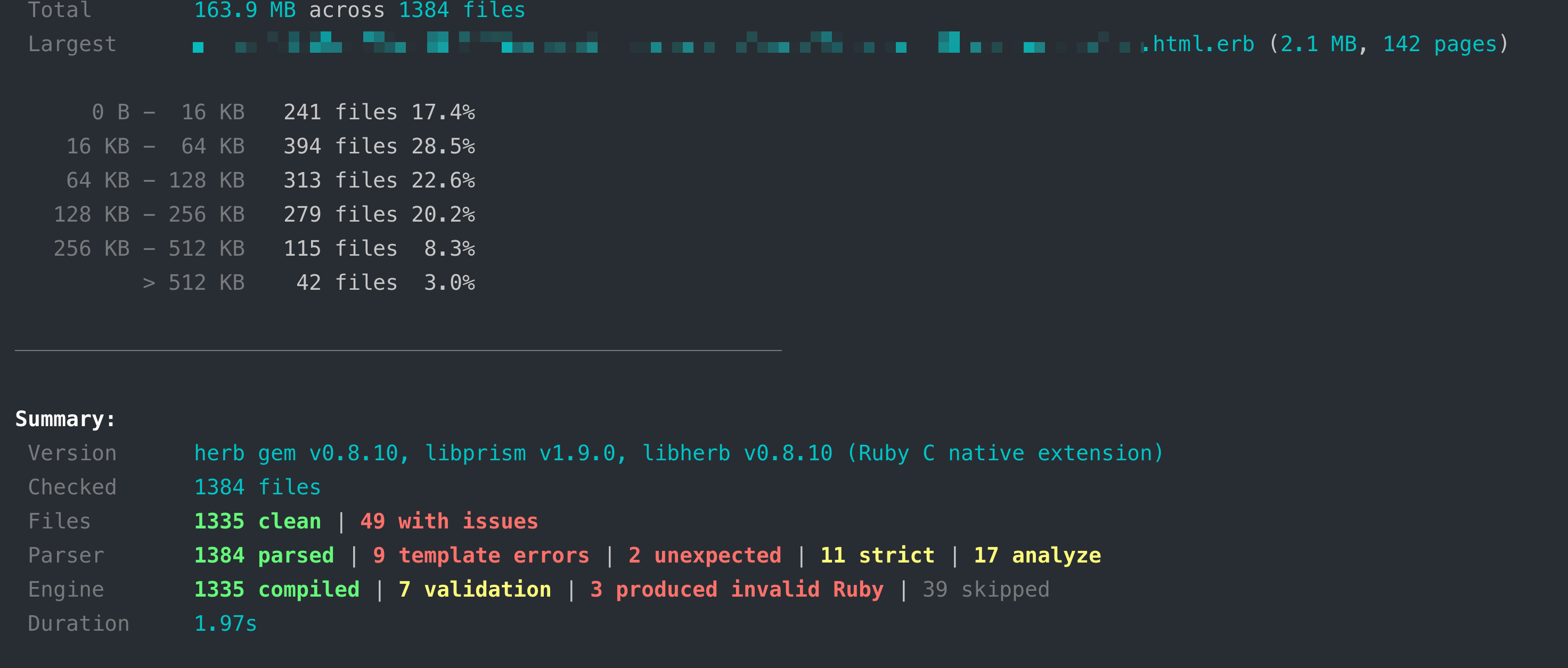
A new Tracking Allocator and --leak-check flag for herb analyze help detect memory leaks during development. You can also use --arena-stats to inspect arena memory usage:
herb analyze --arena-stats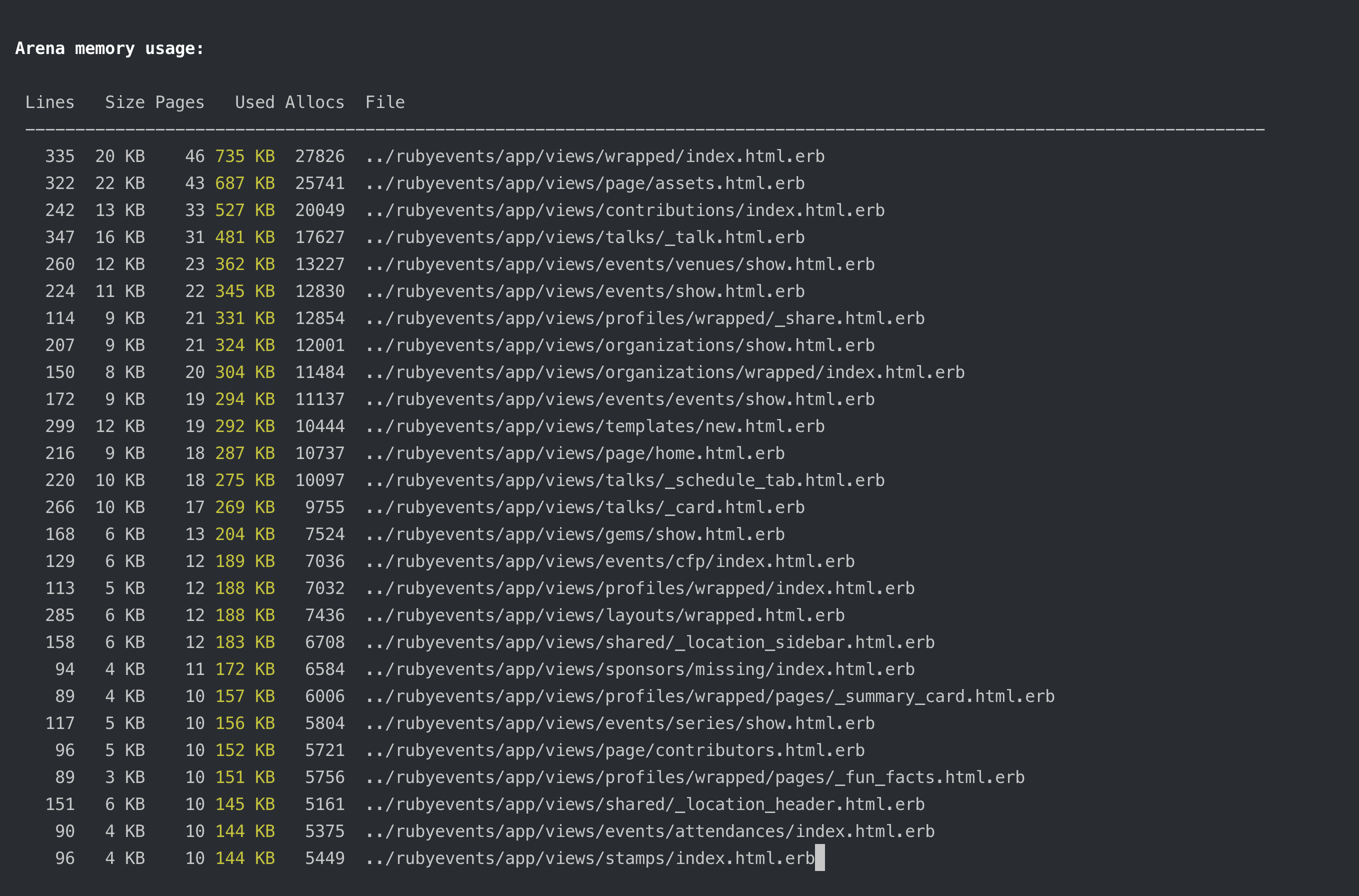
Performance Improvements
Herb v0.9 brings performance improvements at every level of the stack. The arena allocator (covered above) is the biggest single change, but there are many more targeted optimizations throughout the C core that add up:
- Inlined hot-path functions: Frequently called
hb_stringfunctions and lexer peek helpers have been moved tostatic inlinein the headers, eliminating function call overhead on the hottest code paths - Compile-time string length: The
hb_string()constructor has been converted to a macro that computes string length at compile time for string literals, avoiding unnecessarystrlencalls at runtime - Eliminated unnecessary
malloccalls: Error construction andhb_stringoperations that previously allocated memory now use the arena or stack allocation instead - Completed
hb_string_Tmigration: Thehb_string_Tstruct introduced in v0.8 is now used across the entire codebase. Token values (token_T.value), error messages (ERROR_T.message), and all remaining C string usages have been migrated, reducing the total number of allocations per parse significantly - Parallelized linter CLI: The linter now processes files in parallel using a worker pool, cutting lint times roughly in half on multi-core machines (covered in the linter section above)
Rust Binding Improvements
The Rust bindings received two notable improvements:
- Visitors: Idiomatic Rust visitor pattern for traversing the Herb AST
- Configuration: Full support for
.herb.ymlconfiguration in Rust
Exploring a Rust-based Linter and Formatter
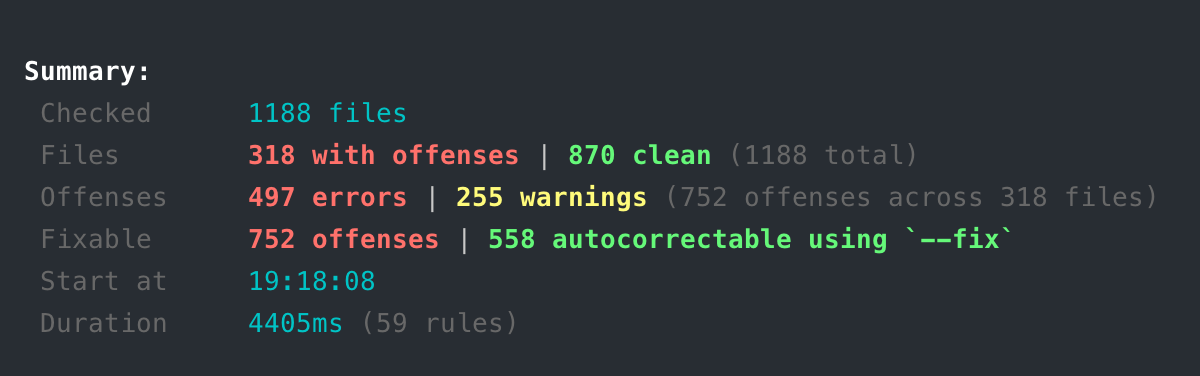
Beyond the bindings, we have been exploring rewriting the Linter and Formatter in Rust. There is a working prototype that can lint files using the same rule set as the current Node.js-based linter. The idea is to have a single implementation that can be used from both Ruby and JavaScript, with identical APIs on both sides.
The other nice side-effect: it's fast. Here's an early comparison on the same codebase:
Current Node.js-based Linter
Rust Linter Prototype
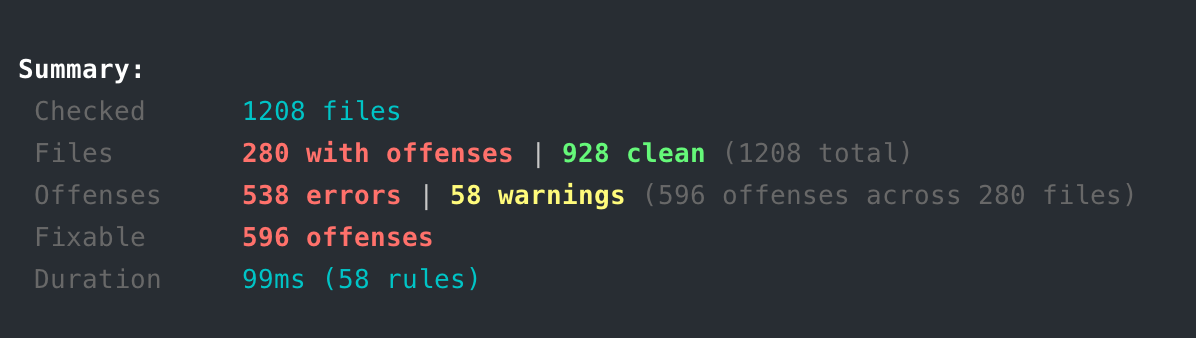
This is still early and exploratory, but the results are promising. More on this in a future release.
Ruby Compatibility
Ruby 4.1+ Support
Herb now works with the upcoming Ruby 4.1, thanks to a fix for native extension loading with the new RubyGems behavior.
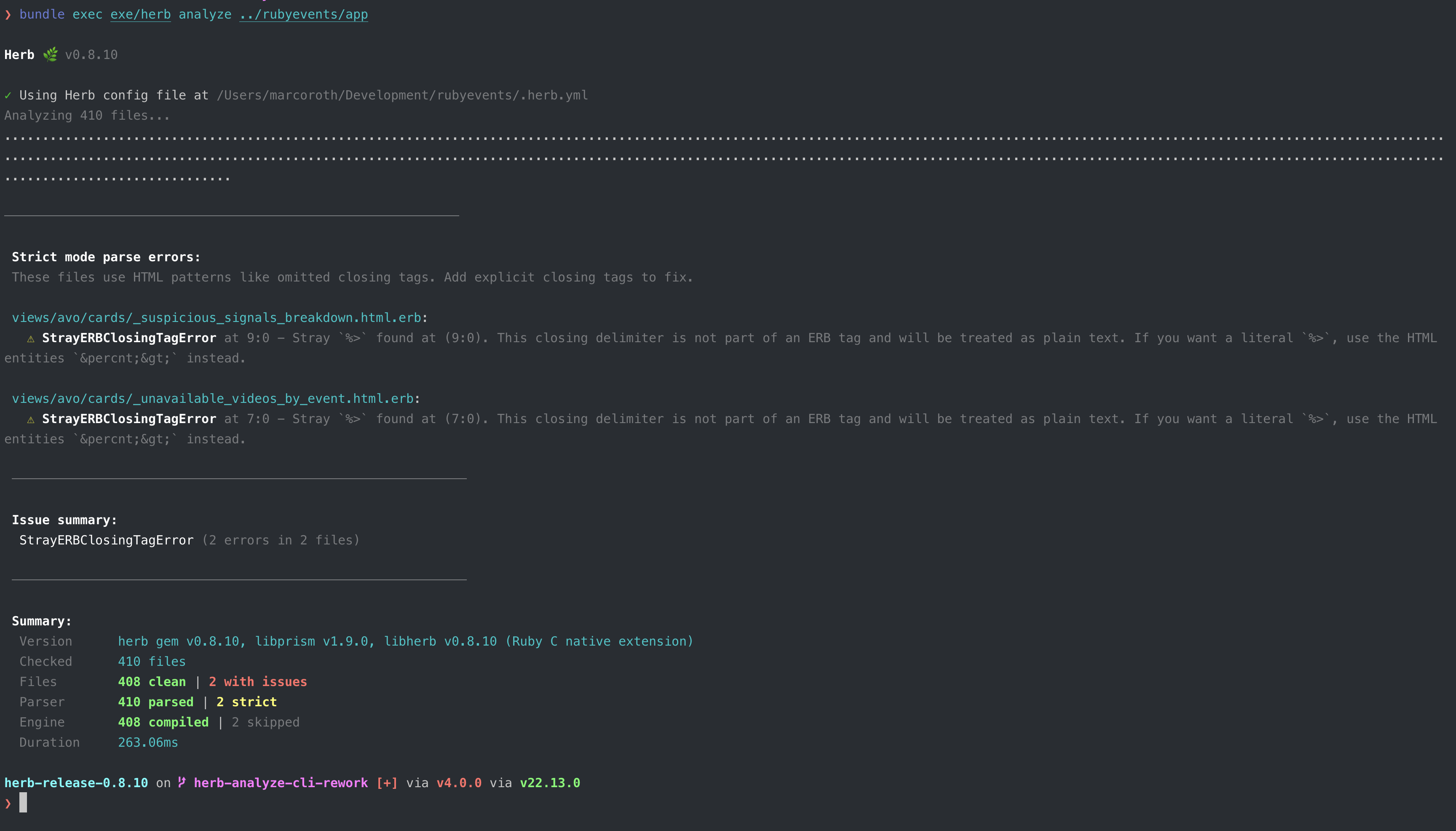
Improved herb analyze Command
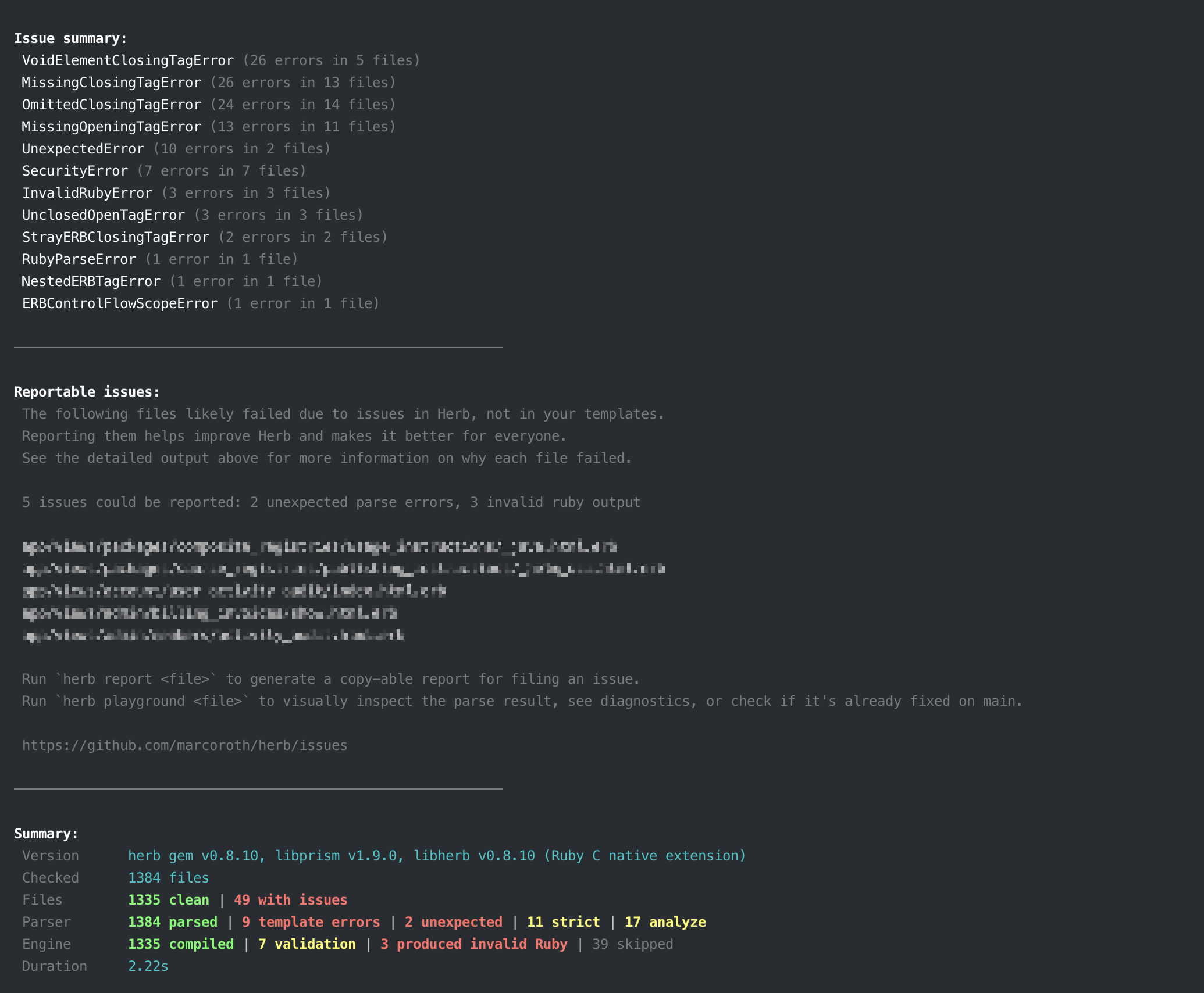
The herb analyze command has been completely reworked. It now produces richer, more relevant output that groups failures by stage and closely matches the visual style of the herb-lint CLI.
Key improvements:
- No argument needed: Running
herb analyzewithout arguments now defaults to the current directory. It also accepts single files, not just directories. - Grouped failures: Failed files are grouped by the stage they failed at (parsing, compiling, evaluating), making it easier to understand what went wrong and why.
- Fallback to less-strict options: The command now automatically retries with less-strict parser and engine options to help identify which strictness setting is causing a failure.
reportsubcommand: A newherb analyze reportsubcommand generates a copy-able Markdown report that can be directly pasted into a GitHub issue.- Arena stats and leak checking: Use
--arena-statsand--leak-checkflags to inspect memory usage and detect leaks.
Other CLI Improvements
stdinsupport: You can now pipe templates directly into the CLI, e.g.echo "<div>Hello</div>" | herb lexor use-to explicitly read from stdin- Node.js binaries: The Herb Ruby gem now exposes the Node.js-based
herb-lintandherb-formatbinaries, making them available directly through the gem's CLI - Error display: The
compilecommand now shows the compiled Ruby source when it produces invalid Ruby, making it easier to debug
Deno Compatibility
Herb's JavaScript packages are now tested against Deno in CI, ensuring compatibility with the Deno runtime alongside Node.js.
Gem Fellowship 2026
We are thrilled to share that Herb has been selected as a 2026 Gem Fellow!
The Gem Fellowship is a grant partnership between gem.coop and Contributed Systems, the company behind Sidekiq Pro and Sidekiq Enterprise. Open Source maintainers were able to submit their proposal for getting a grant.
Herb was one of eight projects which was selected to receiving the grant for:
- Stabilize Herb towards 1.0, with a focus on backwards compatibility and a solid, reliable tooling and language foundation for Ruby.
- Explore reactivity support, laying the groundwork for reactive template rendering in the engine.
This grant will directly support the continued development of Herb, ReActionView, and the wider Herb Tools ecosystem.
A huge thank you for running the gem fellowship initiative and for choosing Herb to receive a grant!
Future Work
Herb v0.9 lays the groundwork for the push towards 1.0. Here's what's on the horizon:
Towards Herb 1.0
With the Gem Fellowship funding and the foundational work in this release, the next milestone is a stable 1.0 release with:
- Stable public API across all language bindings
- Backwards compatibility guarantees for the AST format
- Comprehensive documentation for all public APIs
The 6 Levels of ReActionView
The long-term vision for Herb and ReActionView follows 6 adoption levels, each building on the previous:
- Better Feedback and Developer Experience: Herb catches common issues in real time with better error messages and diagnostics.
- HTML-aware ERB Rendering Engine: The engine understands HTML structure, preventing invalid HTML output.
- Action View Optimizations: Compile-time improvements like inlining partial renders to eliminate runtime lookups.
- Reactive ERB Templates: Diffing templates and re-rendering only what changed when data updates, similar to Phoenix LiveView.
- Universal Client-side Templates: Rendering certain HTML+ERB templates on both server and client for optimistic UI updates and offline support.
- External Components: Mounting external UI components (React, Vue, Svelte) directly within ERB templates.
With Prism node integration and Action View tag helper support in v0.9, Level 3 is now unlocked and something we will start working on next. The Gem Fellowship grant will support exploring Level 4 (reactivity) in the rendering engine, building on the deep structural understanding Herb already has of HTML+ERB templates. It's incredibly exciting to see this vision take shape and become reality, step by step.
Herb Components
We also want to explore what Herb Components could look like: fully isolated, self-contained components that ship HTML, CSS, and JS (behavior) together, with optional server-side interaction. Similar to React components, but for the server-side world, they would encapsulate everything a component needs in one place, building on Herb's understanding of the full template structure.
Expanded Action View Helper Support
The Action View helper infrastructure introduced in v0.9 currently supports tag.*, content_tag, link_to, and turbo_frame_tag. We plan to detect and support more helpers including form_with, button_to, image_tag, javascript_tag, javascript_include_tag, and the full set of Rails form builder helpers. Better detection of Action View tag helpers will enable more precise linting, formatting, and language server features for templates that rely heavily on Rails helpers.
More Language Server Features
We want to continue expanding the language server with more features like go-to-definition, find references, rename support, and diagnostics. A Completion Provider is already in progress, providing completions for HTML tag names, tag.* and content_tag helpers, and Action View helpers like link_to and form_with directly in the editor.
More Linter Rules and Autocorrectors
We continue to grow the linter rule catalog, with around 60 rule proposals in the pipeline. Many existing rules also need autocorrectors, and the new Indentation Printer introduced in this release will help power more sophisticated autofixes.
Rust-based Linter and Formatter
Early experiments with a Rust implementation of the core linter and formatter have shown promising results. A Rust-based implementation would allow us to share a single codebase across Ruby and JavaScript bindings with identical APIs, while also bringing significant performance improvements. This is something we are actively exploring.
Stimulus LSP Integration
The Stimulus LSP will be updated to leverage Herb's new Action View helper support and Prism node integration, providing even richer autocomplete and validation for Stimulus controllers.
We're excited about this release and the road ahead. Get involved, check out the open issues, or reach out if you'd like to help shape Herb's future.
If you have an idea on how Herb could help with improving the developer experience in your current workflow, please open an issue on GitHub and let's discuss.
Acknowledgments
The Herb project continues to grow as a community effort. With 13 contributors, 198 commits, and major features like Action View helper support, Prism node integration, the arena allocator, new language server features like folding ranges and document highlights, engine bug fixes and stabilization, and 24 new linter rules, this release represents a significant step forward.
The selection as a 2026 Gem Fellow is a huge honor and we are very thankful to everyone who believed in Herb's vision and made this possible.
I especially want to thank all 13 contributors who submitted pull requests, and everyone who reported issues, tested early builds, or shared feedback. Your bug reports and real-world usage are what drives the stability improvements in this release. Special thanks to Joel Hawksley for the engine improvements and bug reports, Tim Kächele for the continued C internals work, Michael Kohl for contributions across the parser, linter, and Java bindings, and Kevin Newton for his advice on integrating Prism into Herb.
To support the development of Herb, consider sponsoring the project on GitHub.
Your input, time, and belief in the project continue to drive its progress and make the ecosystem better for everyone. Thank you, and happy hacking!
~ Marco